
Spline-Based Mesh Generation Utility
I built this editor tool to speed up level dressing and content generation in Unity. It is focused on spline workflows so I can iterate quickly while keeping shape generation consistent.
1. Spline Extruder Window
This tool generates a mesh strip from a spline. It samples position, tangent, and up vectors, then builds vertices and triangles along the curve.
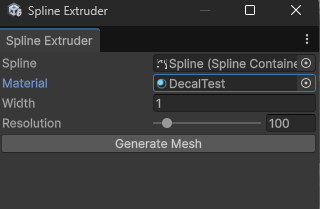
- Creates a custom mesh directly from spline data.
- Configurable width and sampling resolution.
- Automatic UV and triangle generation.
- Creates a ready-to-render GameObject with MeshFilter and MeshRenderer.
- Supports undo for quick iteration in editor workflows.
[MenuItem("Tools/Spline Extruder")]
public static void ShowWindow()
{
    GetWindow<SplineExtruderWindow>("Spline Extruder");
}

if (GUILayout.Button("Generate Mesh"))
{
    if (spline != null)
        GenerateMesh();
}Code - GenerateMesh()
private void GenerateMesh()
{
    var spl = spline.Spline;

    List<Vector3> vertices = new();
    List<Vector2> uvs = new();
    List<int> triangles = new();

    float totalLength = spl.GetLength();

    for (int i = 0; i <= resolution; i++)
    {
        float t = (float)i / resolution;

        spl.Evaluate(t, out float3 posF, out float3 tanF, out float3 upF);

        Vector3 pos = (Vector3)posF;
        Vector3 tan = math.normalize((Vector3)tanF);
        Vector3 up = math.normalize((Vector3)upF);

        Vector3 right = Vector3.Cross(tan, up).normalized;

        Vector3 leftPoint = pos - right * (width * 0.5f);
        Vector3 rightPoint = pos + right * (width * 0.5f);

        vertices.Add(leftPoint);
        vertices.Add(rightPoint);

        float uvX = (float)i / resolution;

        uvs.Add(new Vector2(0, uvX));
        uvs.Add(new Vector2(1, uvX));

        if (i < resolution)
        {
            int baseIndex = i * 2;

            triangles.Add(baseIndex);
            triangles.Add(baseIndex + 1);
            triangles.Add(baseIndex + 3);

            triangles.Add(baseIndex);
            triangles.Add(baseIndex + 3);
            triangles.Add(baseIndex + 2);
        }
    }

    Mesh mesh = new Mesh();
    mesh.name = spline.gameObject.name + "_ExtrudedMesh";

    mesh.SetVertices(vertices);
    mesh.SetUVs(0, uvs);
    mesh.SetTriangles(triangles, 0);
    mesh.RecalculateNormals();
    mesh.RecalculateBounds();

    GameObject meshObj = new GameObject(mesh.name);
    meshObj.transform.SetParent(spline.transform);
    meshObj.transform.localPosition = Vector3.zero;
    meshObj.transform.localRotation = Quaternion.identity;

    MeshFilter mf = meshObj.AddComponent<MeshFilter>();
    MeshRenderer mr = meshObj.AddComponent<MeshRenderer>();

    mf.sharedMesh = mesh;
    mr.sharedMaterial = material != null ? material : new Material(Shader.Find("Standard"));

    Undo.RegisterCreatedObjectUndo(meshObj, "Created Extruded Spline Mesh");
}
This utility was built under the UbiJam namespace and is part of my broader Unity toolchain, similar in spirit to the custom animation workflow shown in my Custom Animator tool.